Breadcrumb: Parent › Practice at home
Track a behavior at home
Record a behavior your child shows at home, with what happened before and after, for a behavior from the plan or a new one, on your phone or on the web.
Your child's BCBA may ask you to note certain behaviors at home, such as tantrums. For each time it happens, you record an ABC: the antecedent (what happened just before), the behavior (what your child did) and the consequence (what happened right after). You pick the behavior from the list your BCBA made, or, when your child does something new, you name it yourself. Your BCBA reads every entry.
Before you start
- The list shows the behaviors your BCBA added to your child's treatment plan. When it is empty, you can still log a new behavior.
- In the mobile app you need an internet connection to save.
Log a behavior from the list
Web
Select Practice at Home in the menu and, with more than one child, pick the child in the selector at the top.
- Scroll to Behavior Tracking, below the targets. Each behavior shows its description and Today's Occurrences, or No occurrences logged today.
- Select Log Behavior on the behavior.
- Fill in the form (see below) and select Submit.
The message Behavior observation logged successfully appears and today's count goes up.
Behavior Tracking appears only when your child also has targets to practice at home. Without them, log behaviors in the mobile app.
Mobile
Start on the My Children screen.
Each child has their own card.
- Tap Log Behavior on the child's card.
- Behavior Tracking lists your child's behaviors under From Treatment Plan, each with today's count, such as Today: 2 occurrences.
- Tap Log on the behavior.
- Fill in the form (see below) and tap Save.
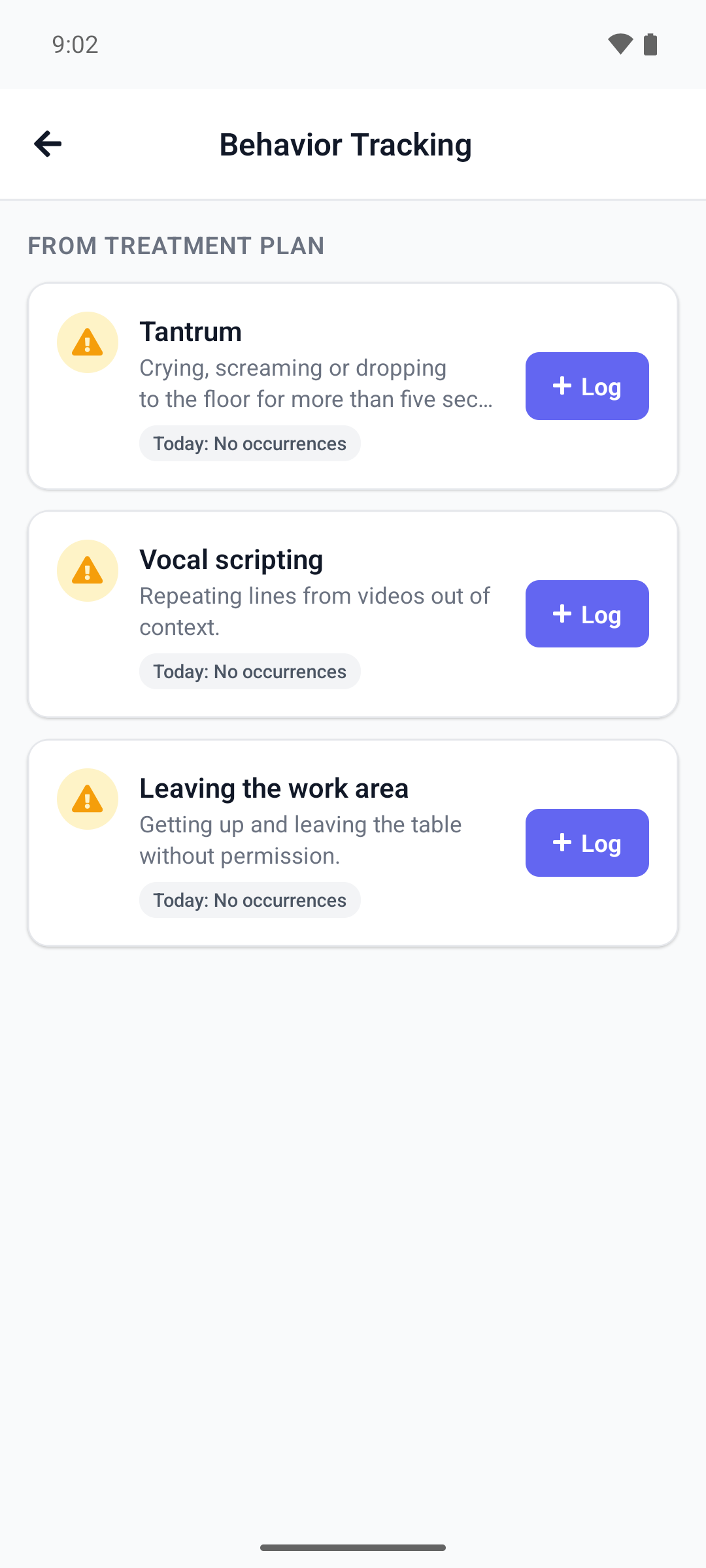
The message Behavior Logged appears and today's count goes up. With an empty list, the screen shows No Behaviors to Track.
Log a new behavior
When your child does something that is not on the list, describe it in your own words. Your BCBA sees it marked as new and can add it to the plan.
Web
On Practice at Home, in the Behavior Tracking section:
- Select Log New Behavior.
- Type a Behavior Name, for example "Throwing toys", and a Description if you like.
- Fill in the rest of the form and select Submit.
Mobile
Start on the My Children screen. The button is under Quick Actions, not on the Behavior Tracking screen.
Log the new behavior for the right child.
- Tap Log Ad-Hoc Behavior. With more than one child, pick the child in Select Child first.
- Log New Behavior opens. Type a Behavior Name and, if you like, a Description (optional).
- Fill in the rest of the form and tap Save.
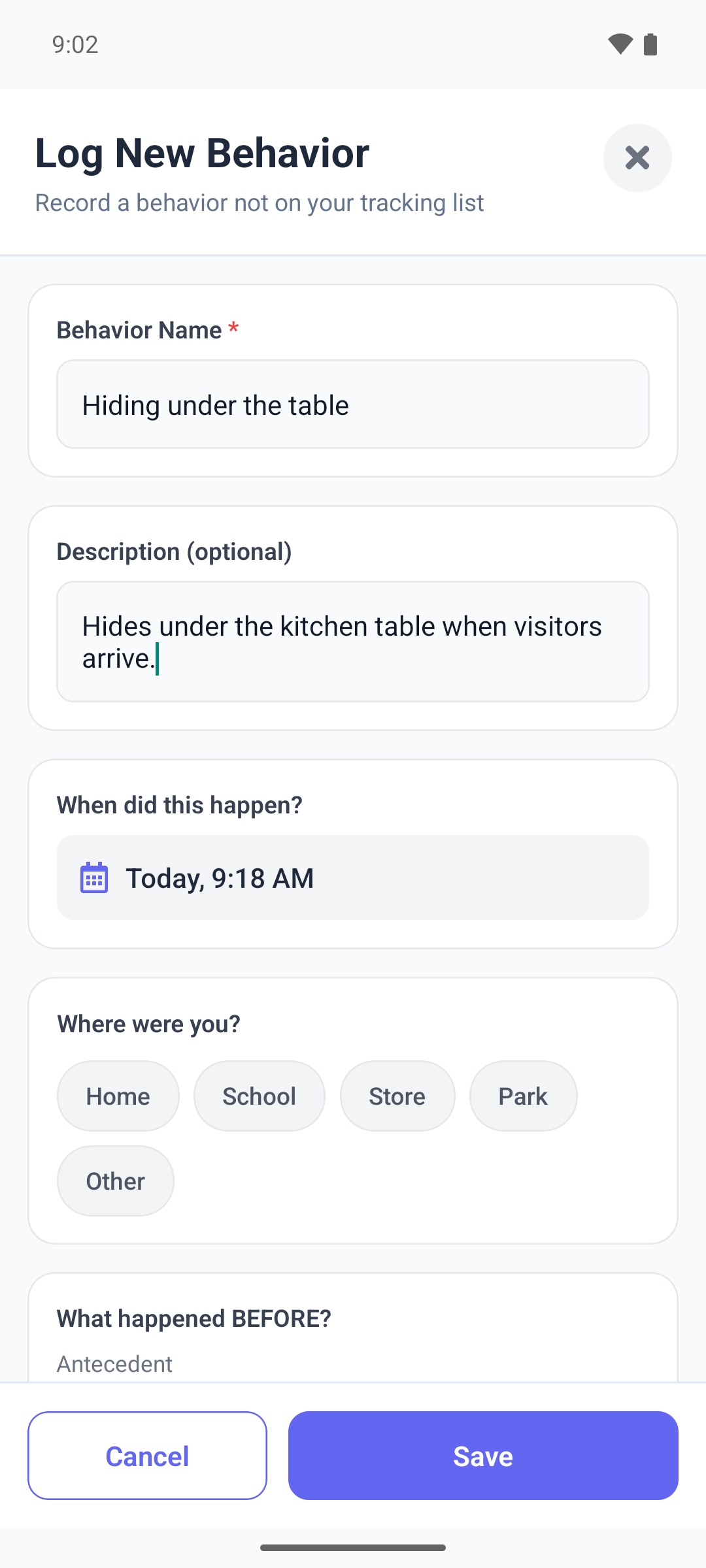
What the form asks
Only What did you see? and, for a new behavior, its name are required.
- When did this happen?: now, unless you change it. You cannot choose a time in the future.
- Where were you?: Home, School, Store, Park or Other. On the web, Other lets you type the place.
- What happened BEFORE?: select a suggestion, type your own words, or both. The suggestions come from your BCBA. On the phone, common ones such as Transition show when your BCBA has set none.
- What did you see?: what your child did, in your words.
- How long did it last?: < 1 min, 1-5 min, 5-15 min or > 15 min.
- How intense was it?: from 1, mild, to 5, severe. On the web, a description such as Moderate - Disruptive shows under your choice.
- What happened AFTER?: what happened right after, such as how you responded. It offers your BCBA's suggestions too, on the web and on the phone; on the phone, common ones such as Ignored show when your BCBA has set none.
- Activity Context on the web, What was happening? on the phone: what you were doing. Optional.
- Notes on the web, Anything else to note? on the phone. Optional.
On the web, the Log New Behavior form offers no suggestions for either question: type your own words.
Once you choose a place, a length or an intensity, you can change it but not clear it. If something required is missing, the web shows a message under the field, and the phone shows Please fill in the required fields and marks the field.
Good to know
- You cannot change or delete an entry. If you logged something by mistake, tell your BCBA.
- On the phone, if saving fails, for example without internet, an error message appears and the form stays open. Try again when you are back online.
- Today's count includes the entries of every parent linked to your child.
- Logs Today on the web counts practice only, not behaviors.
- The web app does not show your behavior entries afterwards. The mobile app lists them: see Review my logged data and feedback.
What happens next
- Your entry waits for your BCBA's review. How the BCBA reviews it: Review data parents log at home.
- When your BCBA adds a new behavior you logged to the plan, it joins your list, so next time you can log it by name.